Welcome to Digitwave Services API Gateway Documentation
Production Version 1.5.4 • Active Service
API Authentication Setup
All transaction operations inside our engine require an active administrative cryptographic verification token passing token called apikey.
This unique string acts as an identity key.
It completely eliminates the need for messy browser cookies, allowing native scripts, web apps, and Android mobile apps to execute transactions securely.
| Parameter Name | Data Type | Description |
|---|---|---|
| apikey | string required | Your platform validation signature token key. Must be included inside the top layer of all incoming payload JSON body arrays or URL strings. |
{
  "apikey": "YTrarsfn7309Ys805"
}
Transaction Status Lifecycle
When interacting with our API, transactions move through a specific lifecycle. Because our transaction processing is asynchronous, your system should monitor these states via our Webhook Events or via GET request polling.
| Status | Type | Meaning |
|---|---|---|
| Pending | Transient | Request created; awaiting execution. |
| Processing | Transient | System is actively executing the task. |
| Processed | Transient | Executed locally; awaiting network settlement. |
| Success | Final | Transaction completed successfully. |
| Failed | Final | Transaction terminated with a failure/Error. |
Send Money Request Gateway
Deducts a specified payment amount from the sender's core active ledger balance.
This API engine automatically determines if configuration rules should not apply
a Percentage charge or a Fixed Amount flat fee.
All fractional figures past the decimal point are immediately cast to integers
and truncated to guarantee accurate, whole-number ledger deductions across transactions.
| Parameter | Type | Description |
|---|---|---|
| apikey | string required | Your platform validation key signature token string. |
| country | string required | The Beneficiary destination country. eg. Republic Of Congo. See the supported countries |
| carrier | string required | Supported operator name eg. Airtel CG. See the supported carriers |
| number | string required | Beneficiary mobile number without country code in supported country & carrier. eg. 0618324342 |
| amount | number required | The transfer request amount value. Decimals are securely discarded (e.g., 40.18 becomes 40). |
{
  "apikey": "YTrarsfn7309Ys8075",
  "country": "Republic of Congo",
  "carrier": "Airtel CG",
  "number": "061234567",
  "amount": 40
}
{
  "success": true,
  "message": "Request accepted, processing in progress",
  "amount": 40,
  "fee_charged": 2,
  "total": 42,
  "remaining_balance": 12408
  "request_id": "A reference Id for this request"
}
{
  "success": false,
  "message": "Insufficient fund/Balance."
}
Withdrawal Settlement Gate
Initiates a secure asset liquidation settlement withdrawal from the wallet. This interface queries your server ENUM attributes,
isolates whether processing metrics follow a Percentage or Fixed Amount, and evaluates user balances.
If funds cover both the withdrawal principal amount and the backend calculated fee,
the transaction drops its decimal parameters and processes immediately.
| Parameter | Type | Description |
|---|---|---|
| apikey | string required | Your platform validation key signature token string. |
| country | string required | The Beneficiary destination country. eg. Republic Of Congo. See the supported countries |
| carrier | string required | Supported operator name eg. Airtel CG. See the supported carriers |
| number | string required | Beneficiary mobile number without country code in supported country & carrier. eg. 0618324342 |
| amount | number required | The transfer request amount value. Decimals are securely discarded (e.g., 40.18 becomes 40). |
{
  "apikey": "YTrarsfn7309Ys8075",
  "country": "Republic of Congo",
  "carrier": "Airtel CG",
  "number": "061234567",
  "amount": 70
}
{
  "success": true,
  "message": "Request accepted, processing in progress",
  "amount": 70,
  "fee_charged": 5,
  "total": 75,
  "remaining_balance": 5238
  "request_id": "A reference Id for this request"
}
Digitwave Services API Webhook
Digitwave Services utilizes webhooks to notify your application instantly and asynchronously whenever a transaction status changes (e.g., shifts to Success or Failed). Instead of constantly polling our API status endpoints, your server can listen for automated incoming HTTP POST requests sent directly to your registered webhook URL.
To guarantee that incoming webhook requests originate strictly from Digitwave Services and have not been tampered with during transit, every payload is cryptographically signed.
| Steps |
|---|
| 1. Locate your Webhook Secret Key (agswhsec_...) inside your Account Dashboard. Keep this token highly secure on your server environment variables. |
| 2. Every webhook request contains a custom header named "X-Webhook-Signature". |
| 3. To verify the payload, calculate a hex-encoded HMAC-SHA256 hash of the raw HTTP request body using your Webhook Secret Key as the cryptographic key. |
| 4. Compare your computed hash with the value inside the X-Webhook-Signature header using a time-constant string comparison function. If they match, the request is authentic. |
HTTP Method: POST
Content-Type: application/json; charset=utf-8
{
   "event": "transaction_updated",
   "created_at":  1787001600,
   "data": {
   "request_id": "987654321",
   "country": "Germany",
   "carrier": "Vodacom",
   "number": "255700000000",
   "amount": 25000,
   "fee_charged": 500,
   "total": 25500,
   "status": "Success",
   "timestamp_ms": "1787001595000",
   "transaction_sms": "Transaction SMS"
  }
}
You can drop this exact script wrapper onto your receiver endpoint to capture, verify, and acknowledge your webhook dispatches cleanly:
<?php
// Enforce strict JSON communication boundaries
header("Content-Type: application/json; charset=utf-8");

// 1. Extract the secure header string sent by Digitwave Services
$incomingSignature = $_SERVER['HTTP_X_WEBHOOK_SIGNATURE'] ?? '';

// 2. Read the raw request body stream text before any decoding
$rawPayload = file_get_contents('php://input');

// 3. Define your shared secret token safely out of your environment variables
$myWebhookSecret = "REPLACE_THIS_WITH_YOUR_WEBHOOK_SECRET_KEY_FROM_DIGITWAVE_DASHBOARD";

if (empty($incomingSignature) || empty($rawPayload)) {
    http_response_code(400);
    echo json_encode(["error" => "Bad Request: Missing payload or signature data structures."]);
    exit;
}

// 4. Compute your local signature match code using HMAC-SHA256
$computedSignature = hash_hmac('sha256', $rawPayload, $myWebhookSecret);

// 5. Securely verify signatures using a timing-attack safe function
if (!hash_equals($computedSignature, $incomingSignature)) {
    http_response_code(401); // Authentication failed
    echo json_encode(["error" => "Unauthorized: Webhook signature verification failed."]);
    exit;
}

// 6. Signatures match perfectly! Process data safely inside your business logic
$payload = json_decode($rawPayload, true);
$transactionStatus = $payload['data']['status'];
$requestId         = $payload['data']['request_id'];

// TODO: Update your internal database logs matching $requestId with the new $transactionStatus

// 7. Always acknowledge receipt within 5 seconds with a clean 200 OK code
http_response_code(200);
echo json_encode(["status" => "acknowledged", "received_at" => time()]);
exit;
?>
Get Single Request Record
Queries the platform transactions table safely using our high-speed, secure parameter-bound execution layers. This retrieves the full parameters and status log of an individual payment request using its unique database row tracking ID.
| Parameter | Type | Description |
|---|---|---|
| apikey | string required | Your unique account identification security token signature. |
| request_id | string required | The precise primary database identifier tracking ID for the transaction record row. |
get_request?apikey=xg7749CT83By05cM76&request_id=10v42
{
  "success": true,
  "data": {
    {
    "apikey": 65GE59hyr453,
    "request_id": 10W6v42,
    "country": Republic of Congo,
    "carrier": Airtel CG,
    "number": 061234567,
    "amount": 55,
    "fee_charged": 0,
    "total": 55,
    "status": "Success",
    "timestamp_ms": 1774983050123 // Epoch milliseconds.
    "transaction_sms": Transaction Message,
  }
 }
}
Get List of Requests
Extracts a fully structured, reverse-chronological array index listing of all historical money transactions linked to the profile. This query applies explicit integer casting rules and returns the data newest-first for rapid developer mapping loops.
| Parameter | Type | Description |
|---|---|---|
| apikey | string required | Your unique account identification security token signature used to safely scope results. |
| last_request_id | string optional | The last request ID in the previous history list. |
| order | string optional, default: order=ASC, options are [ASC, DESC] | Arrange list elements from newest to oldest or vise versa. |
| limit | number optional, default: limit=25, MAX=1000 | The last request ID in the previous history list. |
get_requests?apikey=xg7749CT83By05cM76&last_request_id=65GE59hyr453&order=DESC&limit=50
{
  "success": true,
  "total_records": 2,
  "data": [
    {
    "apikey": 65GE59hyr453,
    "request_id": 10v42,
    "country": Republic of Congo,
    "carrier": Airtel CG,
    "number": 061234567,
    "amount": 55,
    "fee_charged": 0,
    "total": 55,
    "status": "Success",
    "timestamp_ms": 1774983050123 // Epoch milliseconds.
    "transaction_sms": Transaction Message,
  },
    {
    "apikey": 65GE59hyr453,
    "request_id": 10v457EW2,
    "country": Republic of Congo,
    "carrier": Airtel CG,
    "number": 061234567,
    "amount": 55,
    "fee_charged": 0,
    "total": 55,
    "status": "Success",
    "timestamp_ms": 1774983057963 // Epoch milliseconds.
    "transaction_sms": Transaction Message,
  }
  ]
}
Supported Countries & Carriers
Transaction processing is strictly limited to our active global networks.
Every Send and Withdrawal Request payloads must explicitly pass a matching
country and carrier values
selected exactly from this static registry table.

- RESEAU CHARISMATIQUE

- RESEAU CHARISMATIQUE
Testing with Postman
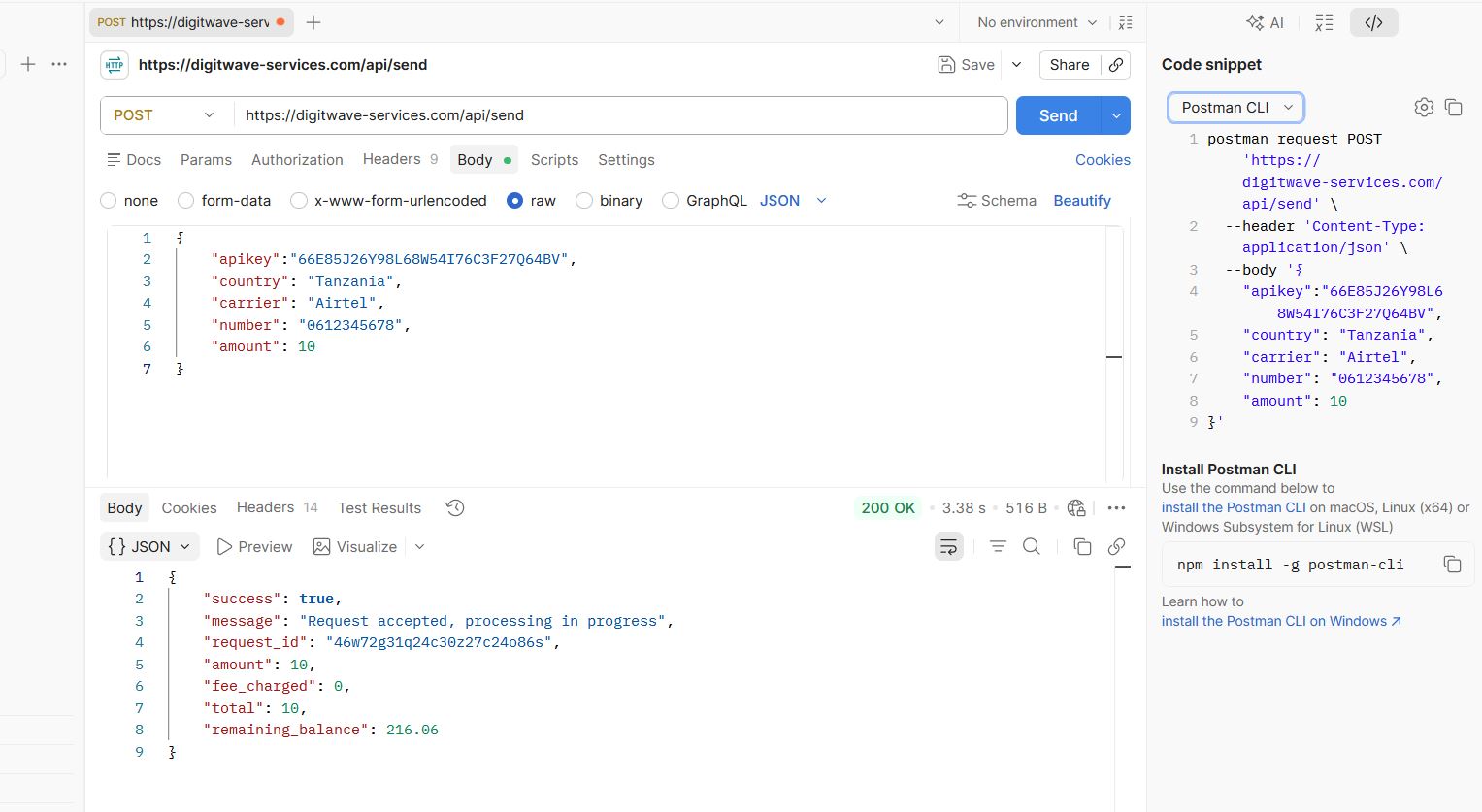
To rapidly test your payload configurations without writing scripts, you can utilize the Postman client application. Ensure you configure your settings exactly as shown:
1. Set your HTTP request method type dropdown modifier to POST.
2. Enter your global endpoint address destination URL.
3. Under the Headers panel layout, confirm that your Content-Type variable matches application/json.
4. In the Body tab section layout configuration, select raw, pick JSON, and map out your JSON input parameters.
{
  "apikey": "7SAuy698305",
  "country": "Republic of Congo",
  "carrier": "Airtel CG"
  "number": "061234567"
  "amount": 500,
}